Skip to content
v1.0.0Open source, out now: see what's in it

Crash-test your architecture before your users do.

ArchSim is a flight simulator for distributed systems. Draw your stack with real technologies, throw traffic and failures at it, and get a straight yes or no against your objectives, with the bottleneck, the breaking point and the monthly bill.

Open source · runs on your machine · no account, no telemetry

DesignTestResults
technology profiles

13 core, 25 experimental, 6 third-party APIs

44
ready-made templates

125 scenarios to compare

25
kinds of clients

mobile, web, API consumers, generic

4
bytes leave your machine

local, open source, no account

0

Quick start

Up and running in one command

You need Docker with Compose, nothing else.

Open http://localhost:3000, choose Open the starter example and press Simulate. Compose pulls ArchSim's release images (ghcr.io/dante0747/archsim-app and archsim-web, for amd64 and arm64) at the version the checkout names. The stack listens on 127.0.0.1 only and has no sign-in. Getting started covers running your own builds, running from source and a five-minute tour; Troubleshooting helps when something won't start.

Run from source, the CLI or the MCP server
Terminal
git clone https://github.com/dante0747/archsim.git
cd archsim
docker compose up        # PostgreSQL, the API, a worker and the web app

Why ArchSim

An honest simulator for the decisions that are expensive to get wrong

Real technologies, real behaviour

PostgreSQL locks rows and waits for its write-ahead log, its replicas lag, Redis forks for snapshots, JVMs pause for garbage collection, Lambda starts cold and Kubernetes pods wait as Pending for a node. Each behaviour links to the vendor's documentation, and each one is a setting you can override.
Every request, every second

A discrete-event engine moves each request through every hop, queue, lock and retry, then replays the run second by second on your diagram. Same document and seed, same result, down to the digest.

A straight answer

Yes or no against your latency and availability objectives, the bottleneck, what to fix first, the highest load that still holds, and the monthly cost on real AWS instance types.

Honest about what it knows

Every default says whether it is documented or illustrative, calibration replaces them with values measured by Prometheus or OpenTelemetry, and the accuracy report publishes predictions against real systems, misses included.

Local-first and open

No account and no telemetry. The web app, a CLI for CI and an MCP server for AI agents share one engine, under the AGPL-3.0.

How it works

Sketch it. Shake it. Ship the one that holds.

Edge
API
Orders DB
Drag, drop, connect from any side
1

Design

Drag in real technologies (PostgreSQL, Redis, Kafka, Kubernetes services, mobile and web clients) and connect them.

Cache outage
2

Test

Send traffic, inject outages and slowdowns, and replay every second like a flight recorder.

Yes, it holds up.

949/s
handled
370 ms
p95
$1,278
per month · AWS
3

Decide

Get a straight yes or no against your objectives, the bottleneck, the breaking point and the monthly bill.

Under the hood

One engine, every request

A design is one versioned JSON document. The engine validates it, sizes every part for the peak load, prices it on real instance types and reviews it; then a discrete-event simulator moves every request through every hop, queue, lock and retry, from a seeded random stream. Each run records its input, seed, engine version and result digest, so it can be repeated and checked bit for bit. The web app reaches the engine through the API, which checks and sizes designs itself and queues runs in PostgreSQL for the workers; the CLI and the MCP server call the engine directly. More in docs/architecture.md.

The product

From a sketch to a straight answer

Real screenshots of ArchSim, the same ones the README shows.

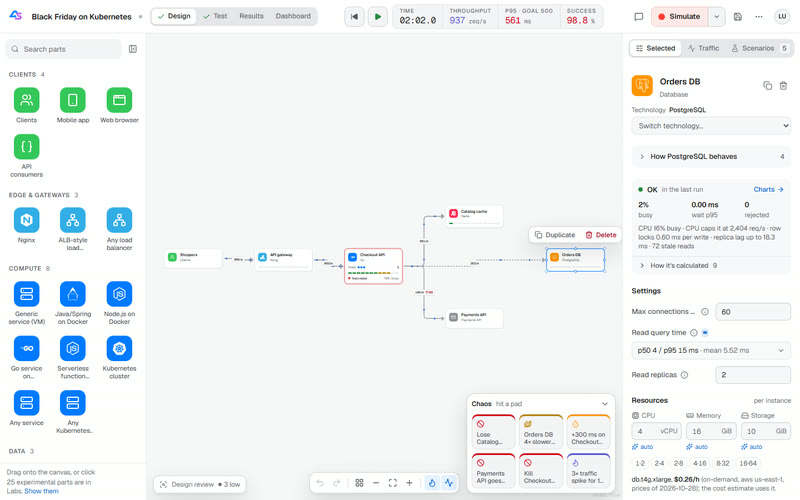
Design workspace: the Black Friday diagram with a PostgreSQL database selected; the inspector shows its replica lag, settings and a real db.t4g.xlarge instance at its hourly price
Design with real technologiesPick PostgreSQL, Kafka or a Go service on Kubernetes, and see how it behaves and what it costs.
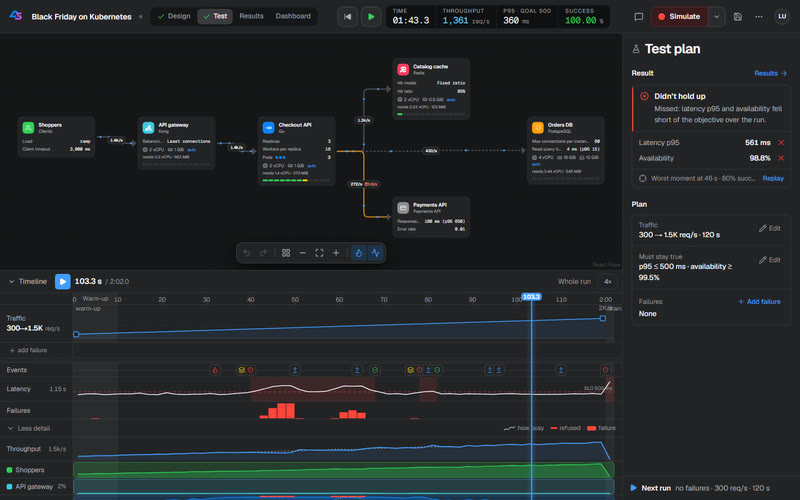
Test workspace: a Kubernetes checkout service scaled to 3 pods mid-ramp, live request rates on the links, and a timeline of traffic, events, latency and failures beside a test plan that did not hold up
Test with traffic and failuresRamp the load, drop a cache, slow a database, then scrub the replay to any second.
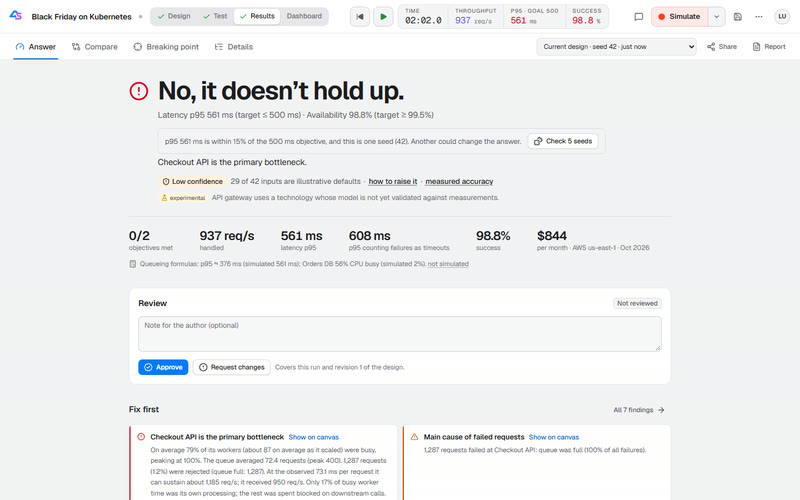
Results Answer tab: No, it doesn't hold up, with p95 561 ms against a 500 ms objective, availability 98.8% against 99.5%, the primary bottleneck, a confidence note and the monthly cost
Get a straight answerThe verdict, the objective that failed, the bottleneck, what to fix first and the bill.
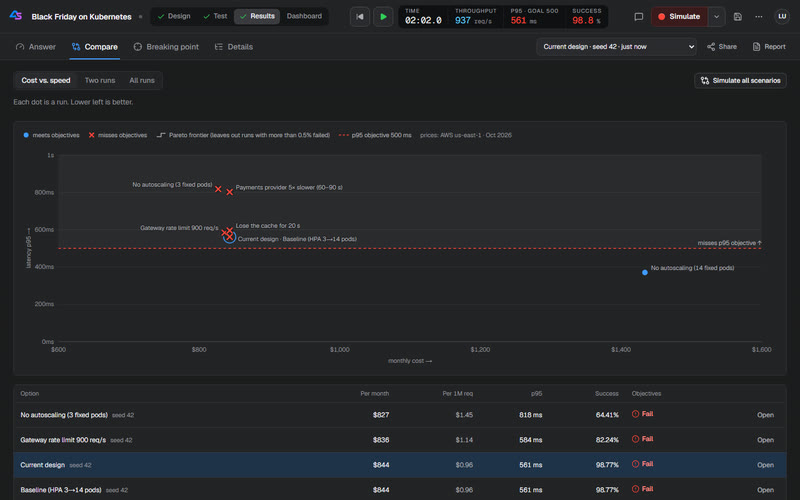
Results Compare tab: monthly cost plotted against p95 latency for every Black Friday run, from 3 fixed pods at $827 a month to 14 fixed pods at $1,434, the only run that meets the objectives; the autoscaler costs $844 and misses the 500 ms p95 objective line, and a table of the runs follows
Compare the optionsEvery scenario on a cost-against-latency map, then a load sweep to find where it breaks.
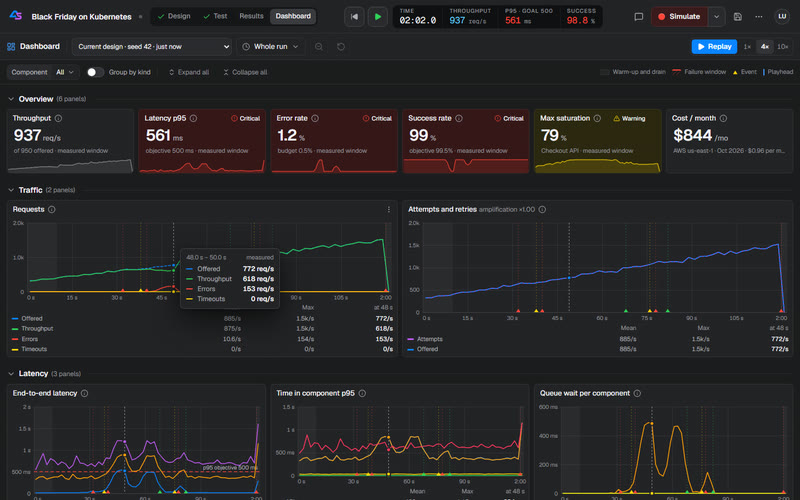
Dashboard workspace: Grafana-style panels for throughput, p95, errors, saturation and cost, with a crosshair synced across latency and queue-wait charts
Watch it like productionA Grafana-style dashboard with per-component signals: lag, lock waits, GC pauses, 503s.
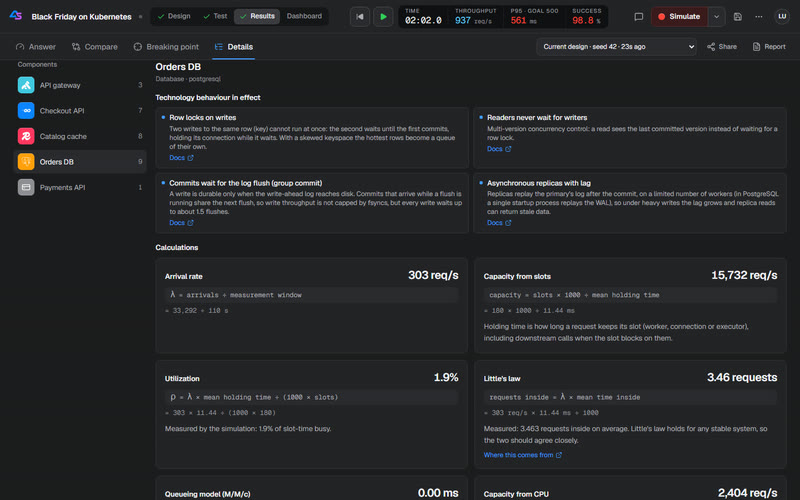
Calculations for a PostgreSQL database: the technology behaviour in effect, then utilization, Little's law and M/M/c queueing formulas filled in with this run's numbers
See the mathsEvery formula behind a number, filled in with the run's values, next to what was simulated.
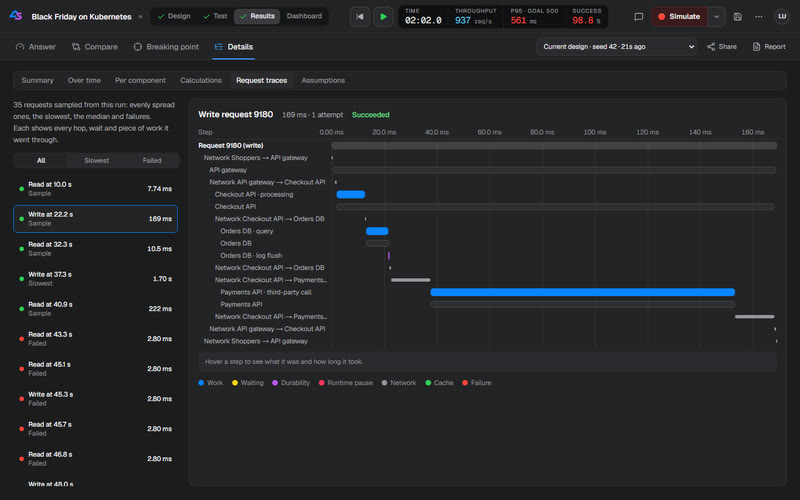
Request traces: a 169 ms write on a waterfall through the gateway, the checkout service, a database query with its log flush and a slow payment call
Follow single requestsSampled traces through every hop, wait, lock, log flush and GC pause.
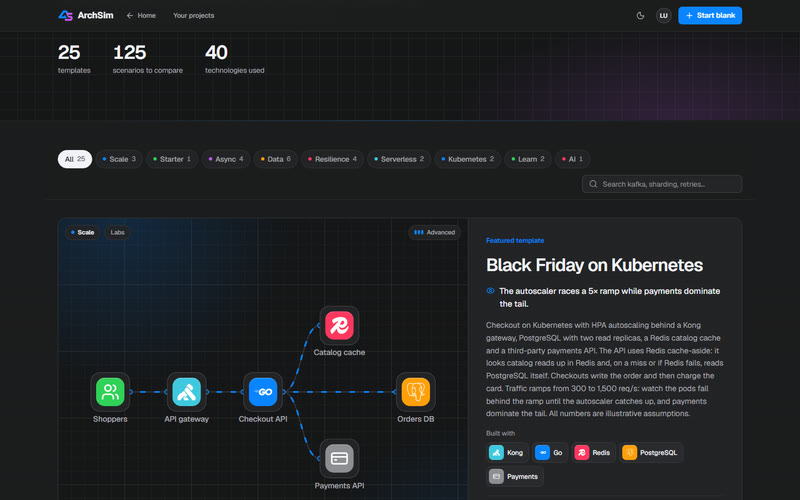
Templates gallery: 25 templates, 125 scenarios to compare and 40 technologies, category filters with their counts, search and a featured Black Friday on Kubernetes template drawn as technology logo tiles
Start from a template25 ready-made architectures, from a cache-aside starter to Kafka, Cassandra and serverless.

Features

Everything a design review argues about, measured

p95 latency LIVE
212 ms
Utilization by component
Replication lag
840 ms
Lock wait
3.1 ms
Event-loop lag
12 ms

Watch it like production

A Grafana-style dashboard for every run: throughput, latency, saturation and every technology's own signals, replayed live with a synced crosshair.

Utilization73%

ρ = λ × hold ÷ (1000 × slots)

= 438 × 6.7 ÷ (1000 × 4)

Network
Waiting for a lock
Query
Log flush

Show your working

Every number comes with its formula and this run's values, and sampled requests show each hop, wait and lock they hit.

Outage · cache · 20–32 sSlow ×4 · payments+200 ms · edge link
Edge
API
Cache
Orders DB

Break things on purpose

Schedule outages, slowdowns and network latency, then watch every part heat up and recover, second by second.

  • Mobile50%
  • Web35%
  • API15%

Clients from every channel

Mobile apps, web browsers and API consumers share the traffic, each with its own timeouts, retries and network.

1 vCPU 2 GiB

CPU caps it at 196 req/s

CPU 100% busy · memory peak 366 MiB of 2 GiB

Sized like real machines

CPU cores, memory and storage on every part. Too few cores and work queues; too little memory and requests are refused.

Cost against speed

Run every scenario and see which options meet your objectives for the least money.

Replicas ×3 → ×7 → ×3

Autoscaling and serverless

HPA-style autoscaling with start-up delays, serverless cold starts and concurrency limits.

kind: Deployment
replicas: 3
resources:
requests: { cpu: "2", memory: "8Gi" }
limits: { cpu: "2", memory: "8Gi" }
kind: HorizontalPodAutoscaler
maxReplicas: 14

From model to manifests

Export Kubernetes or Docker Compose scaffolding with replicas, autoscalers and resource limits from your model.

Run · seed 42adcdc5aff2…
Re-run · seed 42adcdc5aff2…

Same input, same seed, same result digest. Bit for bit.

Reproducible to the bit

Every run records its input, seed and engine version. Re-run it and get exactly the same answer.

Beyond the canvas

Fits the way you already work

  • Calibrate a design from Prometheus metrics or OpenTelemetry traces (calibration).
  • Import docker-compose, Kubernetes manifests or a Terraform plan, and export compose, Kubernetes or Mermaid (import).
  • Gate pull requests on your objectives with archsim check and a GitHub Action (CI).
  • Let AI agents drive it through the MCP server or WebMCP in the browser (agents).
  • Work as a team with GitHub or Google sign-in, workspaces, comments, sign-offs and share links (deployment).
Every workspace and technology behaviour

Real technologies

Model the stack you actually run

44 technology profiles bring the mechanisms their documentation describes, each linked to the vendor's docs and each a setting you can override. A core set comes first; the others are marked experimental.

NginxHAProxyEnvoyKong API gatewayALB-style load balancerAPI-gateway-style (managed)Generic service (VM)Java/Spring on DockerNode.js on DockerGo service on Kubernetes (HPA)Python service on Kubernetes (HPA)Serverless function (Lambda-style)RedisValkeyMemcachedCDN edge cacheVarnishPostgreSQLPostgreSQL + 2 read replicasMySQLSQL ServerCockroachDB-style distributed SQLMongoDB replica setMongoDB sharded clusterCassandraDynamoDB-style key-value storeElasticsearchPayments API
Email APISMS APIIdentity providerLLM inference APIObject storage (S3-compatible)KafkaRabbitMQSQS-style queuePub/Sub-style topicNATS JetStreamRedis StreamsKubernetes clusterEKS-style managed clusterGKE-style managed clusterAKS-style managed clusterk3s (small / edge)iOSAndroidReact NativeFlutterReactNext.jsVueAngularSvelteGraphQLREST / OpenAPI

Accuracy

Measured, not claimed. Misses included.

In 9 experiments on real services, ArchSim was calibrated at low load and predicted where each would break; only then was the breaking point measured with k6. The held-out ones were sealed until a frozen engine had predicted them.

1 of 5

held-out knees predicted within ±25%

4 over-predicted capacity, by 27% to 70%: the unsafe side.

4 of 4

tuned-on knees within ±25%

−16% to +16%, on experiments the model was developed with in view.

0 of 9

experiments meet every proposed threshold

So no technology counts as validated yet.

67

runs, every one published

26 Oct 2026 to 4 Nov 2026, on one machine.

Results are estimates, not production guarantees. Every number comes from the model you drew and the assumptions you entered. Without calibration, trust comparisons between scenarios more than any single absolute value.

Open source

Yours to run, read and change

License

ArchSim is licensed under the GNU Affero General Public License v3.0 only (AGPL-3.0-only). Using it, at work too, is free. If you ship ArchSim inside a product or offer a changed ArchSim over a network, the AGPL asks you to publish your source under the same license; a commercial license from the copyright holder lifts those obligations (ADR-0067). To ask for one, write to abarghooeimajid@gmail.com. Third-party components keep their own licenses (NOTICE).

Contributing

Bug reports, ideas and questions are welcome as issues. ArchSim is offered under the AGPL-3.0 and under a commercial license, so a pull request from outside the project can be merged only once its author has signed the Contributor License Agreement. The agreement is a draft under legal review; until it is in force, outside pull requests wait. AI assistants are welcome, under the rules in CONTRIBUTING.md.

Read CONTRIBUTING.md for the setup and checks, docs/development.md for the layout and tests, and the Code of Conduct. Report vulnerabilities privately, as SECURITY.md describes.

Ready to break something?

Clone it, start it with Docker, open the starter example and press Simulate. Your first answer is seconds away.